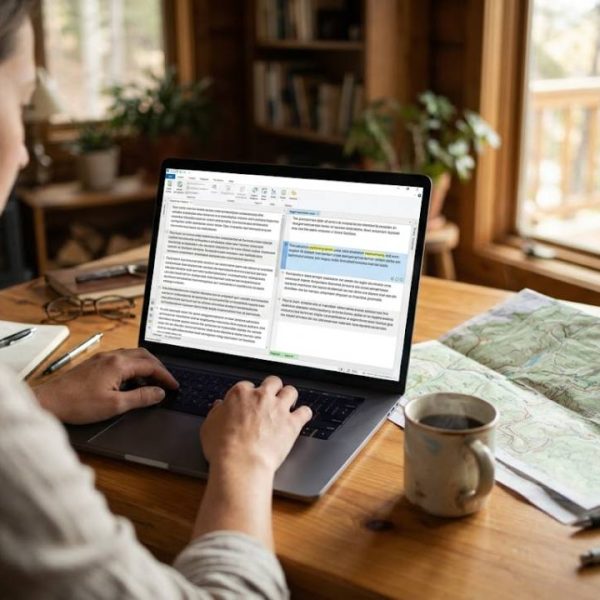
Open a professional translator's laptop and you will rarely see a blank document. You will see a split screen, with the source text on one side, the translation on the other, and a quiet engine in the background that remembers every sentence done before. That engine is a CAT tool, and it has become the standard way serious translation work gets done.
What a CAT tool actually is
CAT stands for computer-assisted translation. It is software that helps a human translator work faster and more consistently. It does not replace the translator. It organizes the text, stores approved wording and flags mistakes so the person can focus on meaning and tone.
If you have ever wondered about the exact definition, the overview of computer-assisted translation gives a neutral summary of the idea and its history.
The building blocks inside
Most tools share the same core parts. Understanding them makes every product comparison easier.
Segmentation
The tool cuts the source text into small units, usually sentences. Each unit gets its own box, which makes progress easy to track and reuse easy to automate.
Translation memory
Every approved sentence pair is saved. When a similar sentence appears later, the tool suggests the earlier translation. The more you translate, the more the tool gives back.
Termbase
A termbase is a list of approved terms. It keeps product names, technical words and brand language identical across a whole project and across several translators.
Quality checks
Built-in checks catch missing numbers, double spaces, broken tags and terms that were not used. These are small errors, but they are the ones clients notice first.
CAT is not machine translation
This is the most common mix-up. Machine translation produces a draft by itself. A CAT tool is the workspace where a person produces, edits and approves the text. Many tools can connect to a machine engine and offer its output as one more suggestion, but the human still decides.
Think of it as a well-organized workshop. The machine may hand over a rough piece, yet the craftsperson finishes it at the bench.
How a typical project runs
A project usually follows the same short path from start to finish.
First, the files are imported. The tool reads formats such as Word documents, spreadsheets, web content and software strings, and protects the layout so it is not damaged.
Second, the text is pre-translated. Matches from the memory fill in automatically, and the translator reviews them rather than starting from nothing.
Third, the translator works through the remaining segments, using the termbase and suggestions along the way.
Finally, quality checks run, a reviewer may read the result, and the files are exported in their original format.
A simple example
Imagine a travel company that publishes a visitor guide every spring. Eighty percent of the text stays the same from year to year, with only prices, dates and a few routes changing. Without a CAT tool, the translator reads the whole guide again. With one, the unchanged sentences arrive already translated and approved, and the translator spends the day on the new material only.
The client pays for the real work, the delivery date comes sooner, and the wording of the guide stays steady from one edition to the next.
Who gets the most value
Freelancers use a CAT tool to deliver faster and keep their own memory as a long-term asset. Agencies use it to share work between linguists and keep a client's wording stable. Companies with manuals, product pages or training material use it to avoid paying twice for the same sentence.
Repetitive content gains the most. A user manual with hundreds of near-identical steps can shrink dramatically in effort once the memory has learned the pattern. Creative writing gains less, because every sentence is new.
There is a buyer's side to all of this as well. When you hire professional translation services, part of what you are paying for is exactly this setup: a shared memory, an agreed termbase, and checks that run before anything reaches you. It is why a good provider can keep a long document consistent from the first page to the last. Asking which tools a provider uses is a fair question, and the answer tells you a lot about how they work.
What to look for when you compare tools
Price is only one factor. Check how well the tool handles your file types, how easily you can import an existing memory, and whether it works in a browser or only on one computer. A modern CAT translation tool should also let a team work in the same project at the same time, with memory and terms updated live.
Look at the editor itself too. A calm, fast interface with clear shortcuts saves more time over a year than any single advanced feature.
Mistakes beginners make
The first mistake is trusting every match blindly. A 100 percent match is still wrong if the context changed. The second is letting the memory fill with unreviewed text, which spreads errors into every future project. The third is ignoring the termbase until the end, when fixing terms costs the most time.
A little discipline early keeps the whole system clean. Approve what you save and review what you reuse.
Where to go from here
If you want to see how the basics fit together in plain language, this guide to CAT tool guide walks through the ideas step by step, with examples from real projects.
Start small. Pick one project, build a memory and a short termbase, and watch the second project go noticeably faster. That quiet compounding effect is the real reason these tools became standard, and why almost every professional workflow now has one somewhere inside it.